
How To Use ShellShadow Client - Shell Users | Shadow Users
Shell User - Person receiving support
The Shell User is the person receiving support. They are called the shell user because this user connects to their server (their shell) and also connects to the relay server. The Shadow User is the person providing support and only connects to the relay server.
- Register for ShellShadow and log-in
- Create a relay session between you and the shadow user. This will create a session id used by you and the other user. The shadow user may also create the relay session, only one of you needs to do this. Each user receives an email notifying them of the session creation. You can view your sessions from your account home page or your sessions history page.
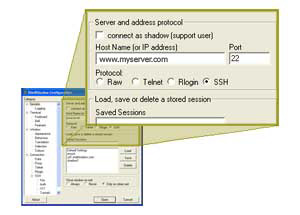
- Open the ShellShadow client from your Windows or Linux desktop and connect to your server. This process is a standard SSH connect and uses either password or SSH keys authentication.
- Connect to the ShellShadow relay server. This connect requires the relay session id you created in step 2, your ShellShadow id and password. Once connected, wait for the other user to connect and you can begin your collaboration.
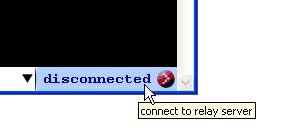
Click the button which reads "disconnected" in the lower right of your terminal window. This button displays the status of your relay connection. Clicking this button opens the "Connect to Relay" dialog window.
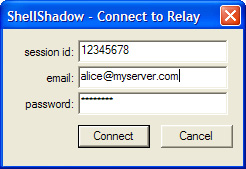
Fill in your relay session id, your ShellShadow user id (email), and your password and click the "Connect" button.
That's it, your connected to both your server and the ShellShadow relay. The status bar at the bottom of your window will let you know when the other user is online. From the status bar, you can control the access of the Shadow User through the drop down menu. The three levels of access for the Shadow User are "Read-Write", "Read-Only", and "Clear Screen".
You can experiment with ShellShadow by creating a relay session where you are both the Shadow and Shell user. This allows you to open the ShellShadow client twice on the same desktop to better understand the experience from both ends.
Shadow User - Person providing support
The Shadow User is the person providing support. They are called the shadow user because they only connect to the relay server. The Shell User is the person receiving support.
- Register for ShellShadow and log-in
- Create a relay session between you and the shell user. This will create a session id used by you and the other user. The shell user may also create the relay session, only one of you needs to do this. Each user receives an email notifying them of the session creation. You can view your sessions from your account home page or your sessions history page.
- Open the ShellShadow client from your Windows or Linux desktop.
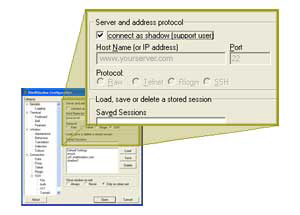
Check the "connect as shadow" check box at the top of the window. Now press enter or click the "Open" button at the bottom of the window.
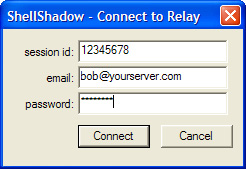
Fill in your relay session id, your ShellShadow user id (email), and your password and click the "Connect" button.
That's it, your connected to the ShellShadow relay server. The status bar at the bottom of your window will let you know when the other user is online. From the status bar, you can see your access which the Shell User has set for you. The three levels of access for the Shadow User are "Read-Write", "Read-Only", and "Clear Screen".
You can experiment with ShellShadow by creating a relay session where you are both the Shadow and Shell user. This allows you to open the ShellShadow client twice on the same desktop to better understand the experience from both ends.